

 Current position > Product detail
『How to Read a Flow Meter Water: Deciphering Municipal Odometer Dials and LCD Totalizers』Related information(clamp on meter|electromagnetic meter|venturi meterrotameter|orifice meter|ultrasonic flow meter|mass flow meter|coriolis mass flow meter|coriolis flow meter|magnetic flow meter|magmeter flow meter|magflow flow meter|mag meter flow meter|electromagnetic flow meter|vortex flow meter|turbine flow meter|thermal mass flow meter|thermal flow meter|rotameter flow meter)
How to Read a Flow Meter Water: Deciphering Municipal Odometer Dials and LCD Totalizers
Quick Answer: For a straight reading odometer, record the black digits left to right and ignore the red decimals unless you bill in partial units. For a circular dial register, record each pointer value and mind the alternating rotation. For industrial water lines, a Silver Instruments electromagnetic flow meter with LCD totalizer gives direct m3 or gallon totals plus 4-20 mA output.
Municipal Odometer Dial Basics
Most municipal water meters use either a straight reading odometer or a circular dial register. The odometer is a row of digit wheels under a glass cover. Black digits show whole units. Red digits show fractions of a cubic meter or gallon. A DN50 municipal meter may show 00123.456 m3. You report 123 m3 if red digits are not required. Operators in Southeast Asia often log this number daily at water treatment plant intake lines. The key is knowing the registration unit on the dial face. It is normally m3 or gallons. Some meters from Australia print kL on the face. One kL equals 1 m3.
Most engineers skip the red digits unless the utility asks for them. The total reading should be left to right. Do not round up a digit just because the next red digit is high. The red digits are decimal places, not the next whole unit.
Circular Dial Register Reading
A circular dial register has several small pointers. Each pointer rotates on a scale of 0 to 9. Adjacent pointers rotate in opposite directions because of internal gearing. Read the pointer as the lower number if it sits between two digits. If the pointer is directly on a number, check the next dial to the right. If the next dial has passed 0, record the number shown. If not, record the lower number. A water utility technician in Latin America showed us this method on a DN80 meter feeding a food plant. The reading was 01278 m3 but the first quick glance gave 01268 m3 because the second pointer was near 7 and the next dial had not crossed 0.
In practice, the pointer between two digits is the easy part. The tricky case is a pointer sitting exactly on a number. Always look at the next dial before you commit to a digit. This habit prevents off by one errors on billing records.
LCD Totalizer on Industrial Flow Meters
An LCD totalizer is simpler. It shows a positive total, a reverse flow total, and often an instantaneous flow rate. On a Silver Instruments electromagnetic flow meter the top line usually displays total volume in m3. The bottom line displays flow rate in m3/h or L/s. You can cycle through units using the keypad. The totalizer can be protected with a password. For irrigation or desalination plants this prevents accidental resets. A DN150 Silver Instruments electromagnetic flow meter on a seawater line in the Middle East can total 100 000 m3 per month and still show high resolution on the LCD. The display also shows battery status, empty pipe alarm, and totalizer overflow.
Here is the thing. A mechanical odometer gives you one number. An LCD totalizer gives you total, flow rate, reverse flow, alarms, and signal output. That is why industrial water lines move away from municipal dials when they need remote monitoring.
Common Reading Mistakes
One mistake is mixing up m3 and gallons. A customer in Vietnam read a totalizer in gallons and reported it as cubic meters. The error inflated the monthly wastewater bill by a factor of 3.78. Always check the engineering unit on the LCD or dial face. Another mistake is reading instantaneous flow rate as total flow. The m3/h value is not the cumulative volume. If the p
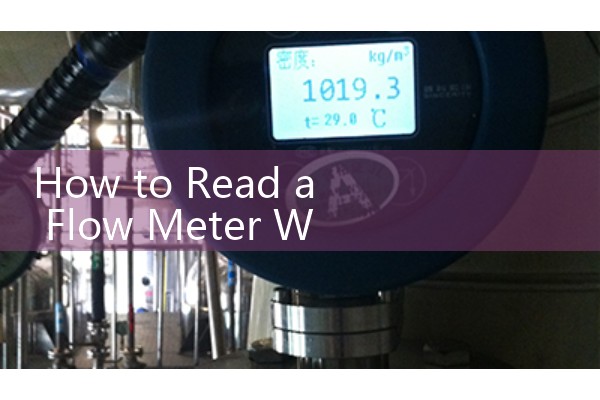
We have seen this on customer sites many times. A batch operator writes down the flow rate at the end of the day and calls it total usage. The correct number is in the totalizer register, not the rate display. On Silver Instruments LCD meters the total is usually the large upper line. The rate is the smaller lower line.
When an Industrial Flow Meter Replaces a Municipal Odometer
Municipal odometer meters work for clean water in full pipes. They do not work well with slurries, viscous fluids, or high solid content. In a paint plant or a chemical dosing skid, an oval gear meter or electromagnetic flow meter is a better fit. A sewage lift station in the Philippines used a municipal meter that jammed after two months. The utility replaced it with a Silver Instruments electromagnetic flow meter rated IP68 for temporary submersion. The LCD totalizer survived the wet season and transmitted totals over RS485 Modbus to a paperless recorder.
For clean water and raw water lines from DN15 to DN300, the Silver Instruments electromagnetic flow meter works with PTFE or rubber liners. Accuracy is plus or minus 0.5 percent of reading from 0.3 m/s to 10 m/s. Output options include 4-20 mA, pulse, and RS485 Modbus. For non full pipes or large channels, the Silver Instruments ultrasonic flow meter with clamp on sensors avoids cutting the pipe. It measures flow from outside and stores totals in the LCD. For high viscosity water based food fluids, an oval gear flow meter can total batch volumes as low as 5 cP. Each of these meters uses an LCD totalizer with direct reading of m3, L, or gallons.
FAQ
What is the difference between odometer dials and LCD totalizer?
Odometer dials are mechanical digits or pointers on a water meter register. An LCD totalizer is an electronic display that shows accumulated volume and often flow rate. Both give the same total flow if correctly read.
How do I read a water flow meter with red digits?
Read the black digits left to right for whole units. Read the red digits as decimals if you need partial units. For billing, report the black digits unless your utility asks for the red digits too.
Can I reset the totalizer on a Silver Instruments LCD flow meter?
Yes but only with a password if you ordered the protected version. For billing and custody transfer we recommend keeping the totalizer locked. Send us your application and we will configure the reset permissions before shipment.
What output signals do Silver water flow meters provide?
Most models provide 4-20 mA plus pulse and RS485 Modbus. Some models also provide HART. The signal varies with flow and can be connected to a PLC, SCADA, or paperless recorder.
What pipe size and flow range should I send for a quote?
Send us the pipe diameter in DN, the minimum and maximum flow rate in m3/h or L/s, the water type, pressure in bar, temperature in °C, and required signal output. We will reply with a model and price.
Silver Automation Instruments
Tel: +86-25-68650347
Whatsapp: +86-25-52155837
WeChat: +86 15365082610
Send us your pipe diameter (DN), flow range, pressure (bar), temperature (°C), and water quality for a water flow meter quote.