

『Fluidwell Flow Meter Displays: Configuring Rugged Explosion-Proof Totalizers and Rate Indicators』Related information(clamp on meter|electromagnetic meter|venturi meterrotameter|orifice meter|ultrasonic flow meter|mass flow meter|coriolis mass flow meter|coriolis flow meter|magnetic flow meter|magmeter flow meter|magflow flow meter|mag meter flow meter|electromagnetic flow meter|vortex flow meter|turbine flow meter|thermal mass flow meter|thermal flow meter|rotameter flow meter)
Fluidwell Flow Meter Displays: Configuring Rugged Explosion-Proof Totalizers and Rate Indicators
Quick Answer: For hazardous area flow metering, select a Fluidwell display with ATEX Zone 1 or Zone 2 certification and match the input type to the flow meter output, pulse or 4-20 mA HART. Set the K-factor in the totalizer first, then scale the analog span for the rate indicator. Silver Automation Instruments supplies compatible flow meters and can pre-configure the display before shipping.
Most engineers learn the hard way that a good flow meter means little without a reliable local display. In a humid chemical plant or on an offshore platform, the display is the operator window into flow total and flow rate. Fluidwell flow meter displays have a strong field record because they use rugged enclosures and simple menus. This article explains how to configure explosion-proof totalizers and rate indicators for real plant conditions.
Why Display Choice Matters in Hazardous Areas
A flow meter in a Zone 1 area needs more than a housing. The electronics, cable entry, and display window must handle flammable gas or dust without ignition. Fluidwell explosion-proof displays rated for ATEX Zone 1 or Zone 2 are supplied with flameproof enclosures and tough glass windows. In many plants, the display sits close to the pipe where an operator can read total flow without opening a control room screen.
We have seen this on customer sites many times. A flow meter is installed 200 m from the control panel. The 4-20 mA signal reaches the PLC, but the local display is the only way for a technician to check batch progress during maintenance. If the display fails, the meter becomes a black box.
Match the Display to the Flow Meter Output
Fluidwell displays accept pulse, active or passive 4-20 mA, and HART signals. The first step is to check the flow meter output wiring. A DN15 oval gear meter often sends a pulse signal to a Fluidwell F018 display. An electromagnetic flow meter on a water line typically sends 4-20 mA plus a frequency output. A Coriolis mass flow meter may send 4-20 mA HART for mass flow and density.
If the display input is pulse, the totalizer counts pulses and converts them with a K-factor. If the input is analog, the rate indicator scales 4-20 mA to engineering units such as kg/h, m³/h, or L/min. Many sites use both. The pulse channel drives the totalizer, and the analog channel drives the rate indicator on the same display.
Totalizer Configuration Steps
Start with the K-factor on the flow meter certificate. For an oval gear meter, this may be 41.6 pulses per liter. Enter that number into the display K-factor menu. Then set the unit to L, m³, or kg. After that, set the decimal point to match the meter resolution. In practice, most engineers skip this part until the total jumps by a factor of 10 on the first batch.
Set a low-flow cut off. A positive displacement meter can register small pulses from vibration or pipe hammer. A cut off of 0.5 to 1 percent of full scale prevents ghost totals. After loading the settings, run a known volume and compare the display total to the reference. Adjust the K-factor only if the meter is new or the fluid viscosity differs from the calibration sheet.
Rate Indicator Scaling for Analog and Pulse Signals
For a 4-20 mA rate indicator, many sites use a Fluidwell F110. Set the 4 mA value to zero flow and the 20 mA value to the maximum flow range. A DN50 electromagnetic flow meter on a demineralized water line may have a range of 0 to 150 m³/h. Enter 0 and 150 in the display. Then select the damping time. A damping of 2 to 5 seconds works for most water and chemical flows. Too much damping hides pump pulses. Too little damping causes the display to jump.
For a pulse input rate indicator, the display uses the same K-factor as the totalizer. Select the time base, usually per second, per minute, or per hour. A fuel oil meter for a boiler may read 0 to 500 L/h. Set the time base to L/h. Then the operator reads the rate directly without calculating volume per minute.
Explosion-Proof Installation and Wiring Notes
The display enclosure is on
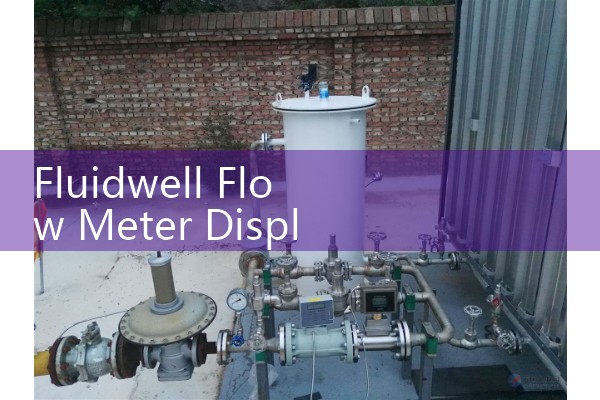
Fluidwell explosion-proof totalizers and rate indicators come with clear terminal labels. Still, the wiring loop must be checked with a multimeter. A 4-20 mA loop needs a supply voltage high enough for the display load. A pulse input needs clean contacts from a reed switch or transistor output. If the pulse signal from a meter is too weak, use a preamplifier or a display with a low-level pulse input option.
Practical Pairings from Field Jobs
Silver Instruments often pairs Fluidwell displays with electromagnetic flow meters, oval gear meters, and Coriolis mass flow meters. A water treatment plant in the Middle East ordered three DN80 electromagnetic flow meters with F-Series displays for raw water, backwash water, and sludge flow. Each display was pre-configured to show 0 to 200 m³/h and total m³. The site saved commissioning time because the settings were loaded before the carton was opened.
For fuel oil batching, a DN25 oval gear flow meter with a pulse output pairs well with a Fluidwell F018 totalizer. The operator enters a batch volume and the relay output stops the pump. Sugar and syrup lines use sanitary meters with rate indicators scaled in kg/h because density changes with Brix. A Coriolis meter with 4-20 mA HART can send mass flow to the display and density to the control system.
A Vietnam Paint Plant Example
Last year a paint manufacturer in Vietnam asked Silver Instruments for a resin flow solution. The fluid viscosity was about 800 cP at 25 °C. The pipe size was DN25. The area was classified ATEX Zone 1 because solvent vapor was present. We supplied a DN25 oval gear flow meter, a Fluidwell explosion-proof display, and a pre-configured K-factor.
The display showed kg/h and total kg. The operator used the display to stop the batch at 2,000 kg. The meter and display ran for eight months without zero drift. The key decision was selecting a positive displacement meter for high viscosity and a display with a pulse input. An analog-only display would have missed the pulse totalizer function.
FAQ
Which Fluidwell display should I use for a simple pulse totalizer? Choose a pulse input totalizer such as the Fluidwell F018 or a similar F-Series model. Send us the flow meter K-factor and we can recommend the exact model.
Can I use one display for both total and rate? Yes. Many Fluidwell displays show total flow and rate on the same screen or by pressing a key. Match the input to the meter output. A pulse input can drive both total and rate channels in most models.
How do I get the K-factor for my flow meter? Check the flow meter certificate. For Silver Instruments flow meters, the K-factor is on the calibration report. If the meter is new, use the certificate value. If you changed fluid or pipe internals, verify with a known volume.
Do explosion-proof displays need special programming tools? No. Most Fluidwell displays use front keys and a menu. You can configure the unit without a laptop. Some models also allow configuration via a USB or magnetic key for hazardous areas.
Can Silver Instruments pre-configure the display before shipping? Yes. Send us your pressure (bar), temperature (°C), pipe size (DN), and flow range. We set the units, K-factor, span, cut off, and relay settings before the box leaves the factory.
Contact Silver Automation Instruments
If you need a rugged flow meter display or a complete metering package, contact Silver Automation Instruments. Call us at +86-25-68650347. Use WhatsApp at +86-25-52155837 or WeChat at +86 15365082610. You can also visit flow-meter.com.au. Tell us the fluid, viscosity, pipe size (DN), flow range, and hazardous area classification. We will recommend a flow meter and Fluidwell display combination that fits your site.
 Hot Blog
 Related AD